
⚡ Quick Answer
Yes — you can absolutely use the TI-84 on the SAT. College Board officially approves the TI-84 Plus CE and all other TI-84 models. You can use it on the entire Math section of the SAT. There are no restrictions on which math problems you can use it for. Just make sure your calculator is charged, and you know how to use it fast. Keep reading for all the rules, approved models, and expert tips.
Official SAT Calculator Policy (2025)
I have been helping students prepare for the SAT for over a decade. The number one question I get — every single year — is about calculators. "Can I bring my TI-84?" Let me give you the straight answer.
College Board, the organization that makes the SAT, has a very clear calculator policy. You can use an approved calculator on the SAT Math section. The test does not have a "no-calculator" section anymore as of March 2024 (when the paper SAT switched to the new format). That means you can use your calculator for all math questions.
The TI-84 Plus CE is on the official College Board approved calculator list. You can bring it to every SAT test.
College Board approves calculators that are designed for math — not for internet browsing or communication. Your TI-84 fits that description perfectly. It does math, graphs equations, and handles statistics. There are no wireless capabilities. That is exactly what College Board wants to see.
The SAT Math section has 44 questions across two modules. You have 35 minutes for each module. Having a reliable calculator you already know how to use can save you valuable minutes on test day.
Which TI-84 Models Are Approved for the SAT?
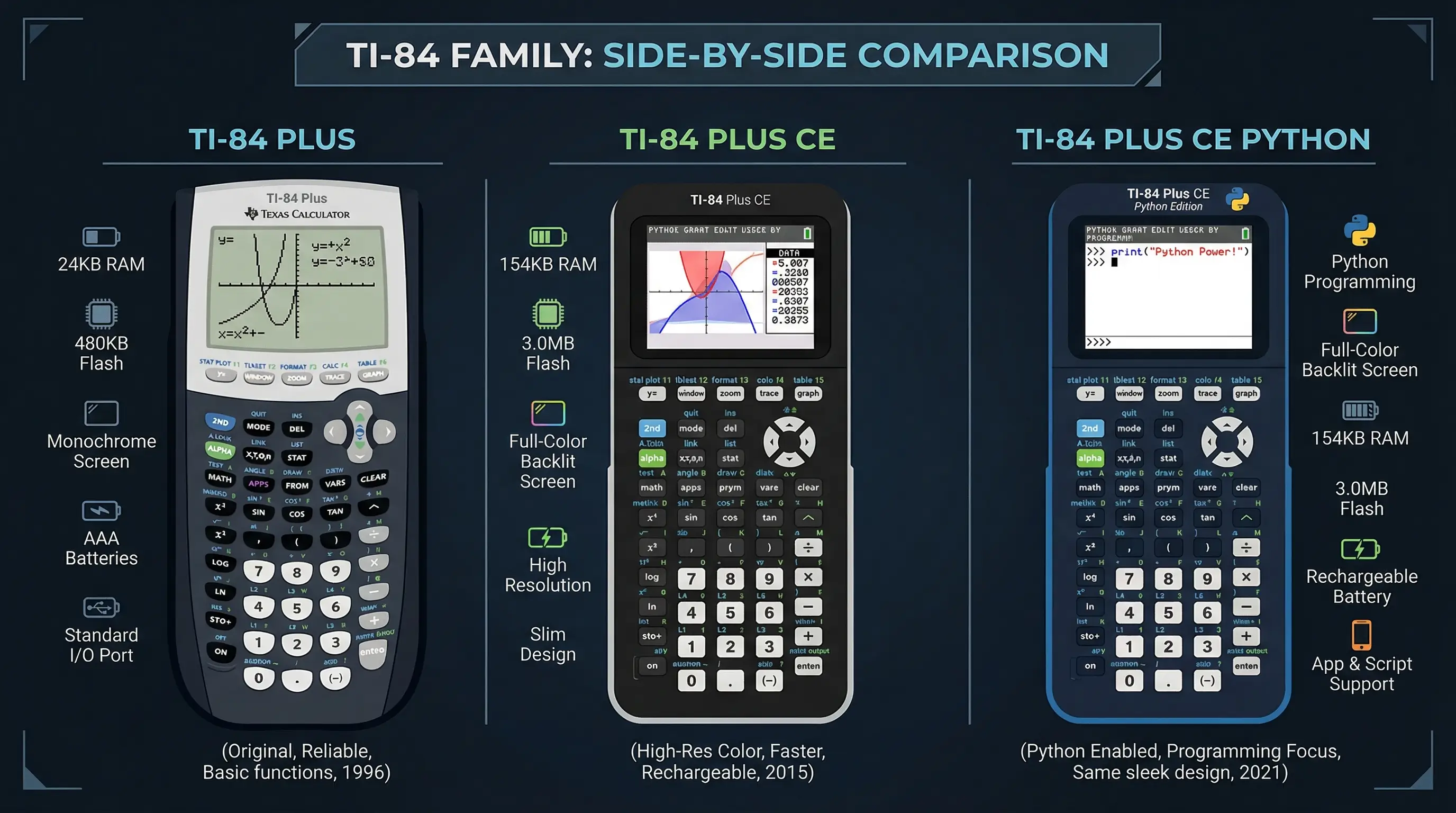
Not just one version of the TI-84 is approved — almost all of them are. Here is a full breakdown:
| TI-84 Model | SAT Approved? | Notes |
|---|---|---|
| TI-84 Plus CE | ✅ Yes | Most popular model. Highly recommended. |
| TI-84 Plus CE-T | ✅ Yes | European version. Works the same. |
| TI-84 Plus | ✅ Yes | Older model, still approved. Black & white screen. |
| TI-84 Plus Silver Edition | ✅ Yes | Approved. Slightly more memory than base model. |
| TI-84 Plus C Silver Edition | ✅ Yes | Color screen version. Approved. |
| TI-84 Plus CE Python | ✅ Yes | Python edition. Approved but Python apps disabled during test. |
Best choice? The TI-84 Plus CE. It has a full color screen, rechargeable battery, and is the most widely taught model in American schools. If you do not own one, you can practice with our free TI-84 Plus CE online emulator right now — for free.
What You Cannot Do on the SAT With Your Calculator
The TI-84 is approved — but there are still rules. The SAT is very specific about how you use your calculator. Breaking these rules can get you disqualified. Here is what you need to know:
| Action | Allowed? |
|---|---|
| Use TI-84 for all math questions | ✅ Allowed |
| Use graphing functions | ✅ Allowed |
| Use calculator with pre-stored programs | ✅ Allowed (if legal) |
| Connect TI-84 to another device | ❌ Not Allowed |
| Use a calculator with internet access | ❌ Not Allowed |
| Use a phone or smartwatch as a calculator | ❌ Not Allowed |
| Use a calculator with audio/camera | ❌ Not Allowed |
| Share your calculator with another student | ❌ Not Allowed |
| Bring a charger or power cord | ❌ Not Allowed |
Important: Programs stored in your TI-84 are technically allowed. However, College Board says programs that store formulas, notes, or provide an unfair advantage may be considered cheating. Store only programs that perform extra calculations — not shortcuts that store test answers or notes.
Battery Rule — Very Important!
Your TI-84 Plus CE uses a rechargeable battery — just like a phone. The SAT testing room will not let you plug it in to charge. If your calculator runs out of battery mid-test, you are stuck. Always charge it the night before your exam until it is at 100%.
Old TI-84 Plus models use AAA batteries. If you have one of those, bring a fresh pack of batteries and switch them out the evening before test day.
TI-84 vs Other SAT Calculators — Which Is Best?
I have seen students walk into the SAT with everything from a $10 dollar-store calculator to a TI-Nspire CX II. Here is my honest take after watching thousands of students take this test:
| Calculator | SAT Approved? | Best For | Price |
|---|---|---|---|
| TI-84 Plus CE | ✅ Yes | Most students — familiar, powerful | ~$120 |
| TI-Nspire CX II | ✅ Yes | Advanced math — more features | ~$150 |
| Casio fx-9750GIII | ✅ Yes | Budget-friendly option | ~$50 |
| Basic scientific calculator | ✅ Yes | Students who only need arithmetic | $10–$20 |
| Phone calculator | ❌ No | Never use on SAT | N/A |
My recommendation? Stick with the TI-84 Plus CE. Here is why:
- It is the most commonly taught calculator in American high schools. The chances are you already know how to use it.
- Graphing on the SAT saves time. You can solve certain algebra and geometry problems visually instead of doing long algebra by hand.
- The TI-84 has a statistics menu that calculates mean, standard deviation, and regression with just a few button presses.
- The color screen makes reading graphs easy and fast — no squinting at low-resolution pixels.
Don't own a TI-84 Plus CE? Use our free TI-84 Plus CE online emulator to practice right now. It works exactly like the physical calculator — no download, no cost.
7 TI-84 Tips to Boost Your SAT Math Score
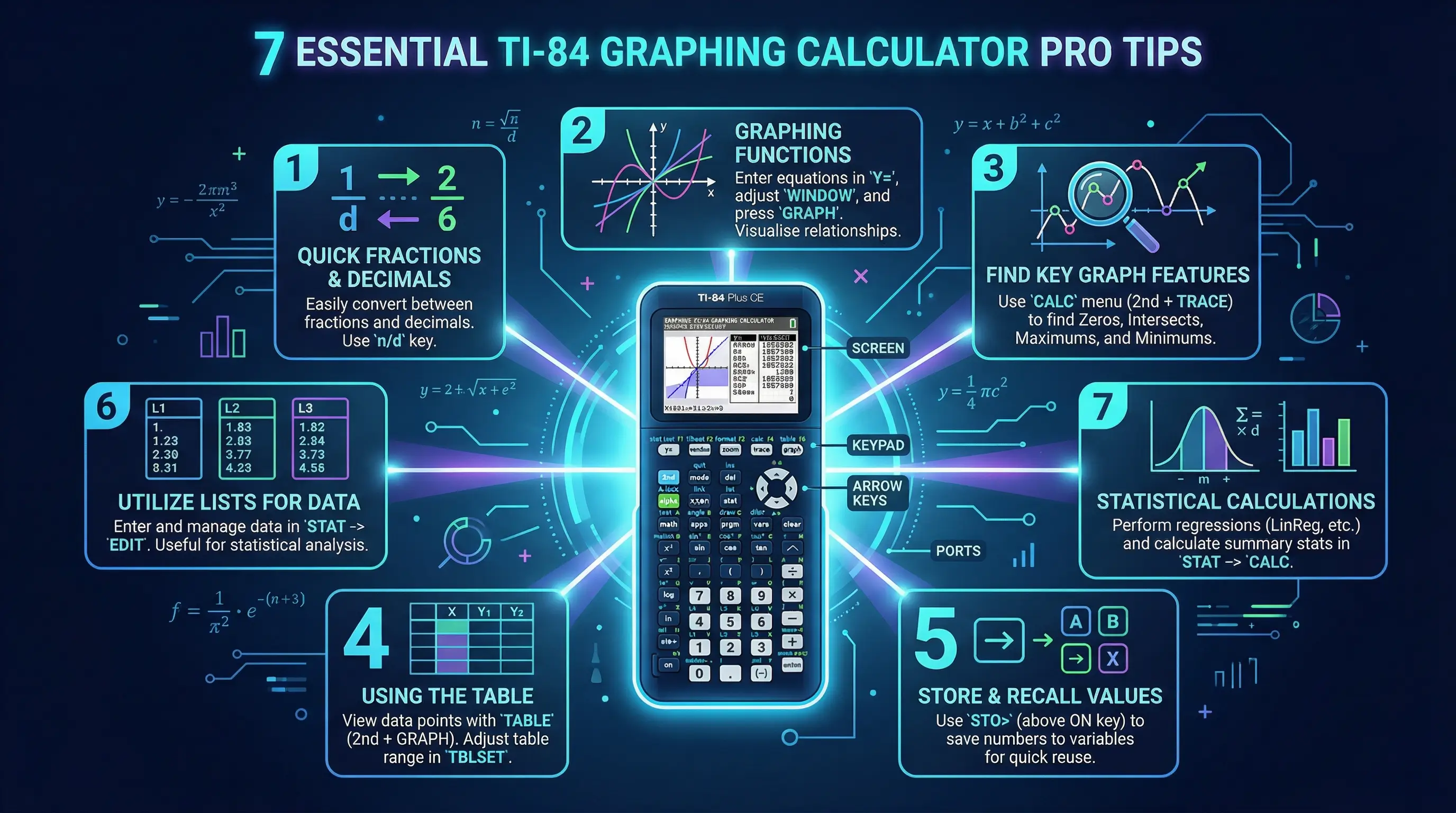
Owning a TI-84 is one thing. Knowing how to use it fast during a timed test is another. Here are 7 tips I give every student I work with before the SAT:
-
1
Graph equations to find answers instantly
If you see an equation problem, graph it. Press [Y=], type the equation, hit [GRAPH], then use [2nd] + [CALC] to find intersections or zeros. This is often faster than solving by hand — and you get the exact answer.
-
2
Use the TABLE feature to check values
After graphing, press [2nd] + [GRAPH] to open the TABLE. It shows you a list of exact (x, y) values for your equation. This is perfect for checking if a specific value satisfies an equation — no algebra required.
-
3
Store numbers in variables to avoid re-typing
If a problem gives you a value like π = 3.14159 or a long number, store it. Type the number, then press [STO→] and a letter key (like X). Now type X in your calculations. No more typos on long numbers.
-
4
Use STAT for mean, median, and standard deviation
The SAT loves statistics questions. Press [STAT], go to EDIT, and enter your data in L1. Then press [STAT], go to CALC, and select 1-Var Stats. It calculates mean (x̄), standard deviation (Sx), and min/max instantly — saving you minutes of hand arithmetic.
-
5
Fix a blank graph with ZoomFit
Did you graph something and see a blank screen? Do not panic. Press [ZOOM] and select option 0 (ZoomFit). The calculator automatically adjusts the window to show your graph. This saves at least 30 seconds of fumbling with window settings.
-
6
Use the fraction template for cleaner answers
Press [ALPHA] + [Y=] to open the fraction template. This lets you type fractions exactly as they look in the problem — so you reduce the chance of order-of-operations errors when entering something like (3+5)/(2-1).
-
7
Practice with our free TI-84 online before test day
Muscle memory matters. The more you use your calculator, the faster you will be on test day. If you do not have a physical TI-84, use our free online TI-84 Plus CE emulator every day this week. It is identical to the real thing.
What About the Digital SAT?
Starting in 2024, the SAT is now offered in a digital format through Bluebook, College Board's official testing app. This is different from the paper SAT. Here is what you need to know about calculators and the Digital SAT:
- Built-in Desmos calculator: The digital SAT has a free calculator built directly into the software. It is a Desmos graphing calculator — the same engine that powers our free Graphing Calculator page.
- Bring your own calculator too: College Board still allows you to bring an approved physical calculator (like your TI-84) to the digital SAT. Many students prefer it because it is faster for certain calculations.
- Online TI-84 simulators are NOT allowed: You cannot open a website or use an internet-based calculator on a test device. The Bluebook app locks your screen.
Taking the digital SAT? Practice with both the Desmos graphing calculator (same as the built-in SAT tool) AND our free TI-84 emulator. Knowing both gives you a huge advantage on test day.
🖩 Practice for the SAT — Right Now
Want to get comfortable with the TI-84 before test day? Use our free browser-based TI-84 Plus CE emulator. It works exactly like the physical calculator — and it's completely free. No downloads, no sign-ups.
Launch Free TI-84 Calculator →SAT Tip: If you prefer a scientific calculator over a graphing one, the TI-30XS Calculator is fully approved for the SAT and exceptional at fractions.
Frequently Asked Questions
Yes. The TI-84 Plus CE and all TI-84 family models are officially approved by College Board for use on the SAT. You can use it on all math questions — there is no longer a separate "no-calculator" section on the SAT (as of 2024).
All major TI-84 models are approved: the TI-84 Plus, TI-84 Plus Silver Edition, TI-84 Plus C Silver Edition, TI-84 Plus CE, TI-84 Plus CE-T, and TI-84 Plus CE Python. Any TI-84 you find in a school is almost certainly on the approved list.
No — online calculators are not allowed at the in-person SAT testing center. However, our free TI-84 online emulator is a perfect practice tool. Use it every day before your test to build speed and confidence with the real thing.
No. Unlike the ACT (which sometimes requires a test mode for certain devices), the SAT does not require your TI-84 to be in a special test mode. You can use it normally. Just do not load it with apps or programs that store answers or notes.
No. Chargers and power cords are not allowed at the testing table. Always charge your TI-84 Plus CE the night before the exam. If you have a TI-84 Plus with AAA batteries, replace them with fresh ones before test day.
Yes — for most students. The TI-84 lets you graph equations, which can turn difficult algebra problems into simple visual lookups. It also has a full statistics menu that calculates mean, standard deviation, and regressions automatically. A basic scientific calculator cannot do any of this. If you have a TI-84, use it.